


MediaPickerButton
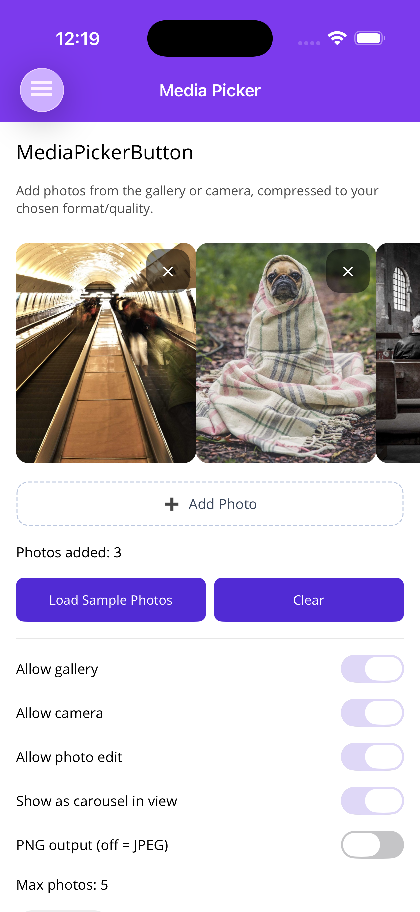
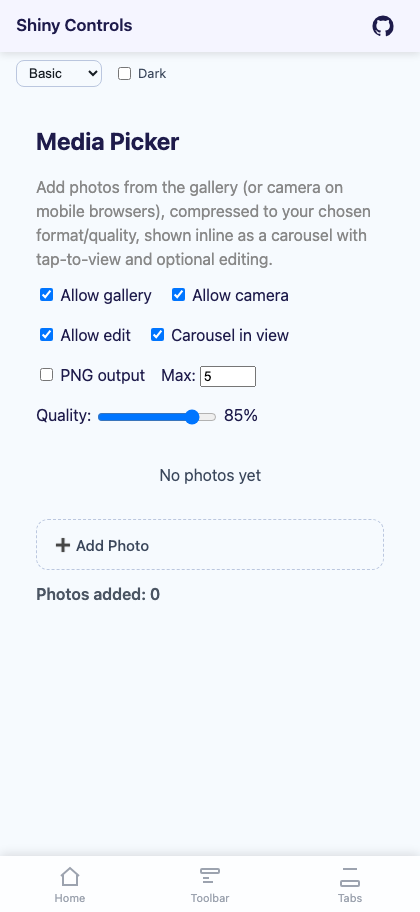
A button that lets the user add photos from the gallery and/or camera, compresses/re-encodes each to PNG or JPEG at a chosen quality (with optional max-dimension downscale), caps the count with MaxPhotos (added one at a time — the OS pickers are single-select), and shows the collected photos inline as a tappable carousel (opening the ImageViewer, with an optional Edit button that reuses the ImageEditor) or a compact pinch/zoom overlay. It ships inside the base packages — no extra dependency.


Screenshots
Section titled “Screenshots”MAUI
Blazor
Basic Usage
Section titled “Basic Usage”.NET MAUI
Section titled “.NET MAUI”<shiny:MediaPickerButton Photos="{Binding Photos}" AllowGallery="True" AllowCamera="True" AllowPhotoEdit="True" ShowAsCarouselInView="True" MaxPhotos="5" CompressionQuality="85" OutputFormat="Jpeg" PermissionDeniedText="Photo access was denied — enable it in Settings." />[ObservableProperty]ObservableCollection<MediaPickerItem> photos = new(); // Shiny.Maui.Controls.MediaOutputFormat is Shiny.Maui.Controls.ImageEditor.ImageExportFormat (Png / Jpeg).
Blazor
Section titled “Blazor”<MediaPickerButton @bind-Photos="photos" AllowGallery="true" AllowCamera="true" AllowPhotoEdit="true" ShowAsCarouselInView="true" MaxPhotos="5" CompressionQuality="85" OutputFormat="jpeg" PermissionDeniedText="Photo access was denied." />
@code { IReadOnlyList<Shiny.Blazor.Controls.MediaPickerItem> photos = [];}On Blazor OutputFormat is a string ("jpeg" / "png"), and each MediaPickerItem exposes a DataUri you can bind directly to <img src>.
Properties
Section titled “Properties”| Property | Type | Default | Description |
|---|---|---|---|
AllowGallery |
bool | true |
Offer “choose from gallery” |
AllowCamera |
bool | true |
Offer “take photo”. When both are enabled, tapping shows a gallery/camera chooser |
AllowPhotoEdit |
bool | false |
Show an Edit button in the viewer that opens the ImageEditor; edits are re-saved into the collection |
PermissionDeniedText |
string | “Permission denied…” | Message shown when camera/gallery access is denied |
NoImagesTemplate |
DataTemplate? / RenderFragment? | null |
Shown when there are no photos yet (default: “No photos yet”) |
ShowAsCarouselInView |
bool | true |
true → inline thumbnail carousel; false → compact preview that opens a paged pinch/zoom overlay |
MaxPhotos |
int | 1 |
Maximum photos; the add trigger hides once reached |
CompressionQuality |
int | 92 |
Encoder quality as a percentage (1–100) |
MaxImageDimension |
int | 0 |
If > 0, the longest edge is downscaled to this many pixels |
OutputFormat |
ImageExportFormat / string | Jpeg / "jpeg" |
Output encoding — PNG or JPEG |
Photos |
IList / IReadOnlyList of MediaPickerItem |
empty | The collected photos (two-way) |
AddButtonText |
string | “➕ Add Photo” | Text on the add trigger |
GalleryActionText / CameraActionText |
string | “Choose from Gallery” / “Take Photo” | Chooser labels |
UseFeedback |
bool (MAUI) | true |
Haptic/sound feedback on actions |
Events
Section titled “Events”PhotoAdded/PhotoRemoved— a photo was added or removed (MediaPickerItem).PhotosChanged(MAUI event +PhotosChangedCommand; BlazorEventCallback) — the collection changed.PermissionDenied— camera/gallery access was denied (message string).
How it works
Section titled “How it works”- Multi-photo is add-one-at-a-time — each tap picks/captures a single photo and appends until
MaxPhotos. The OS pickers do not offer native multi-select here. - MAUI is a plain
ContentViewusing the built-inMicrosoft.Maui.Media.MediaPicker— no handler or builder registration. TheMediaPickerdrives the OS permission prompts; a denial surfacesPermissionDeniedText. - Blazor self-imports its JS module (no DI). Gallery/camera use a hidden
<input type="file" accept="image/*">(withcapture="environment"for the camera); compression/resize/format-conversion happen on an offscreen canvas. - Viewing reuses the ImageViewer (pinch/zoom); editing reuses the ImageEditor.
AI Skill
Section titled “AI Skill”Step 1 — Add the marketplace:
claude plugin marketplace add shinyorg/skillsStep 2 — Install the plugin:
claude plugin install shiny@shinyOne plugin installs all 35 Shiny skills. Your agent loads only the skill relevant to what you're building, so there's no cost to having them all available.
Step 1 — Add the marketplace:
copilot plugin marketplace add https://github.com/shinyorg/skillsStep 2 — Install the plugin:
copilot plugin install shiny@shinyOne plugin installs all 35 Shiny skills. Your agent loads only the skill relevant to what you're building, so there's no cost to having them all available.