


Admin UI (ShinyDocDbMyAdmin)
ShinyDocDbMyAdmin is a phpMyAdmin-style front end for DocumentDb stores. Connect to a database, browse the documents in it, edit them, run SQL, manage JSON indexes, and move data in and out. No user management, no server administration — just the documents.
It comes in two forms over one admin layer: a web app, shipped as a container image, and a
terminal app, shipped as a dotnet tool. They share the connection
store, the secret handling and the bundle format, so they are the same tool with two ways to look at it.
The web app is Blazor Server, shipped as a container image and nothing else:
docker run -p 8085:8080 -v shiny-docdb-myadmin:/data ghcr.io/shinyorg/shiny-docdb-myadminThe same image is on Docker Hub as aritchie/shiny-docdb-myadmin — the same digests, published by the
same build, so the two registries can never disagree about what a version contains. Pull from whichever
you prefer.
On Docker Desktop there is a shorter way in. The extension adds a tab that starts that container, renders the app inside the tab, and hands it every database container already on your machine, connected:
docker extension install aritchie/shiny-docdb-myadmin-extensionThe terminal app is where a local install makes sense:
dotnet tool install -g ShinyDocDbMyAdmin.Tuishinydocdb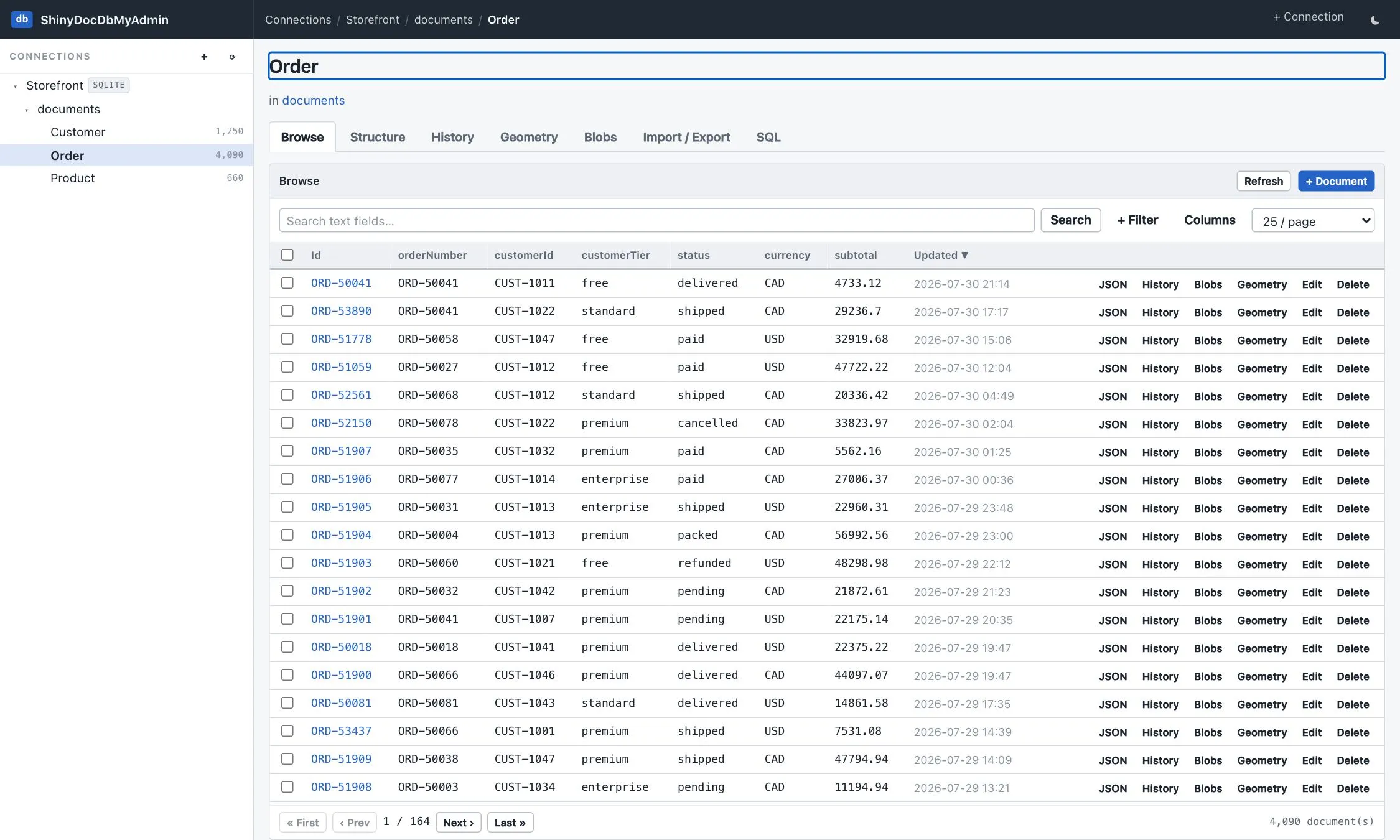
What’s in it
Section titled “What’s in it”| Page | What it’s for |
|---|---|
| Connections | Point the tool at a database — a server, an uploaded file, or one your host declares. |
| Browse & edit | A sampled-column grid with JSON-path filters, a formatted JSON view, and a JSON editor. |
| Structure & indexes | The inferred shape of a type, table statistics, and one-click index management. |
| Query console | DocumentDb’s string query grammar and the database’s own SQL, with query plans. |
| History | Temporal versions, field-level diffs and restore. |
| Geometry | GeoJSON drawn on a server-rendered map, with per-feature statistics. |
| Full text | Ranked search through the provider’s own full-text engine. |
| Vectors | Embedding statistics, sidecar drift detection, and exact nearest-neighbour search. |
| Blobs | Attached payloads, listed and previewed without ever selecting the bytes. |
| Encrypted fields | Envelopes read and described, key coverage across a type, and a guard against overwriting one. |
| Outbox | Queue depth, dead-letter triage and requeue for the transactional outbox. |
| Generate test data | More documents that look like the ones already there. |
| Import & export | Streaming JSON, NDJSON, CSV and envelope JSON in both directions. |
| AI assistant | A read-only chat over your data, configured per connection. |
| Aspire AppHost | The tool as an Aspire resource, wired to the stores you already model. |
| Terminal UI | The same tool as a dotnet tool, sharing this one’s connections and bundles. |
| Docker Desktop | An extension tab that runs the tool in place and connects the databases already on your machine. |
| Configuration & security | Settings, the secret key, read-only mode, and what is defended against. |
| Demo mode | One flag that turns the whole app into a public playground. |
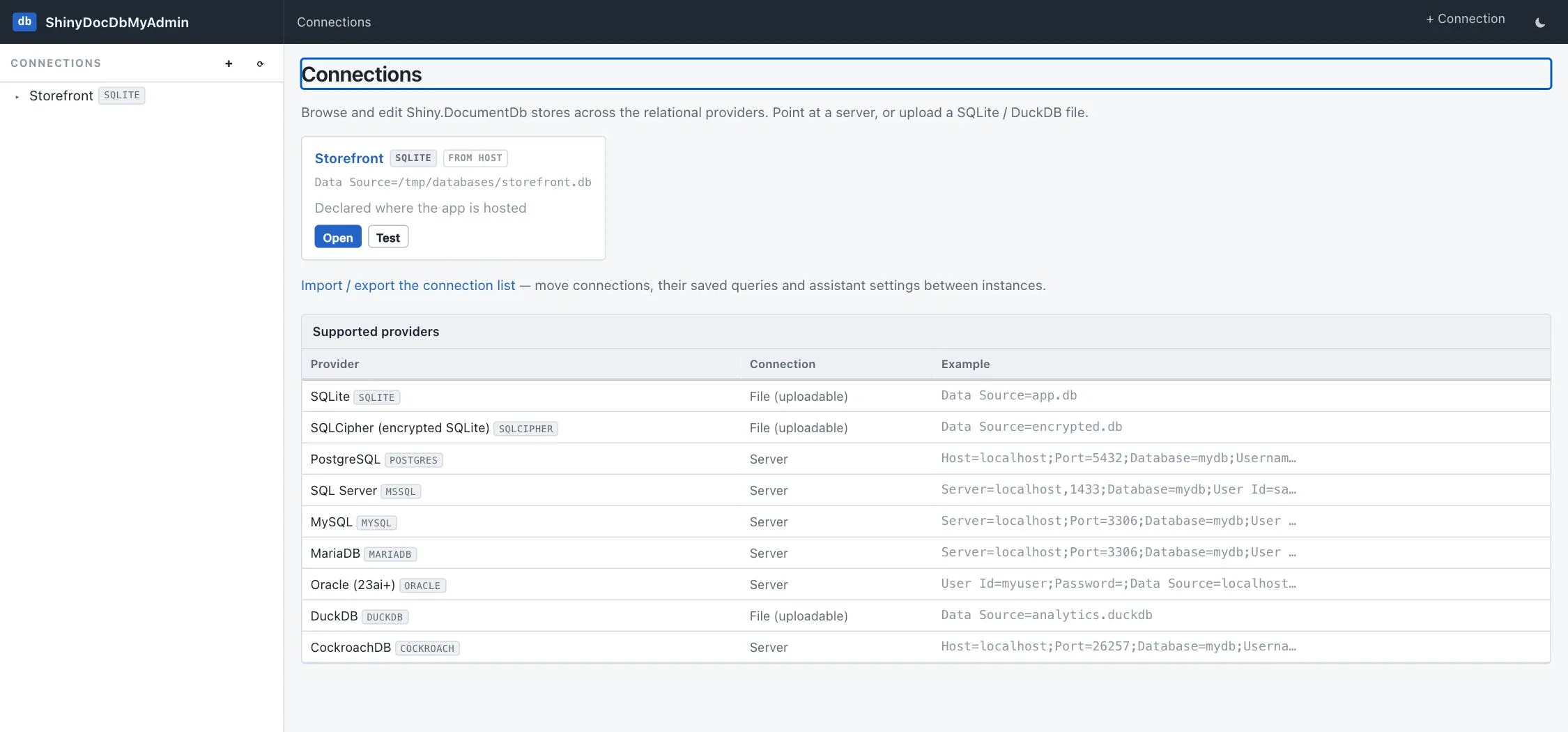
Supported providers
Section titled “Supported providers”Every relational DocumentDb backend:
| Provider | Connection | Notes |
|---|---|---|
| SQLite | file, uploadable | |
| SQLCipher | file, uploadable | needs the encryption key |
| DuckDB | file, uploadable | takes an exclusive lock while open |
| PostgreSQL | server | |
| SQL Server | server | |
| MySQL | server | |
| MariaDB | server | |
| Oracle 23ai+ | server | |
| CockroachDB | server |
The document stores (MongoDB, Cosmos DB, LiteDB, IndexedDB, …) are deliberately out of scope: this tool
works against the shared Id / TypeName / Data / CreatedAt / UpdatedAt envelope over ADO.NET, which only
the relational providers expose.
Explorer
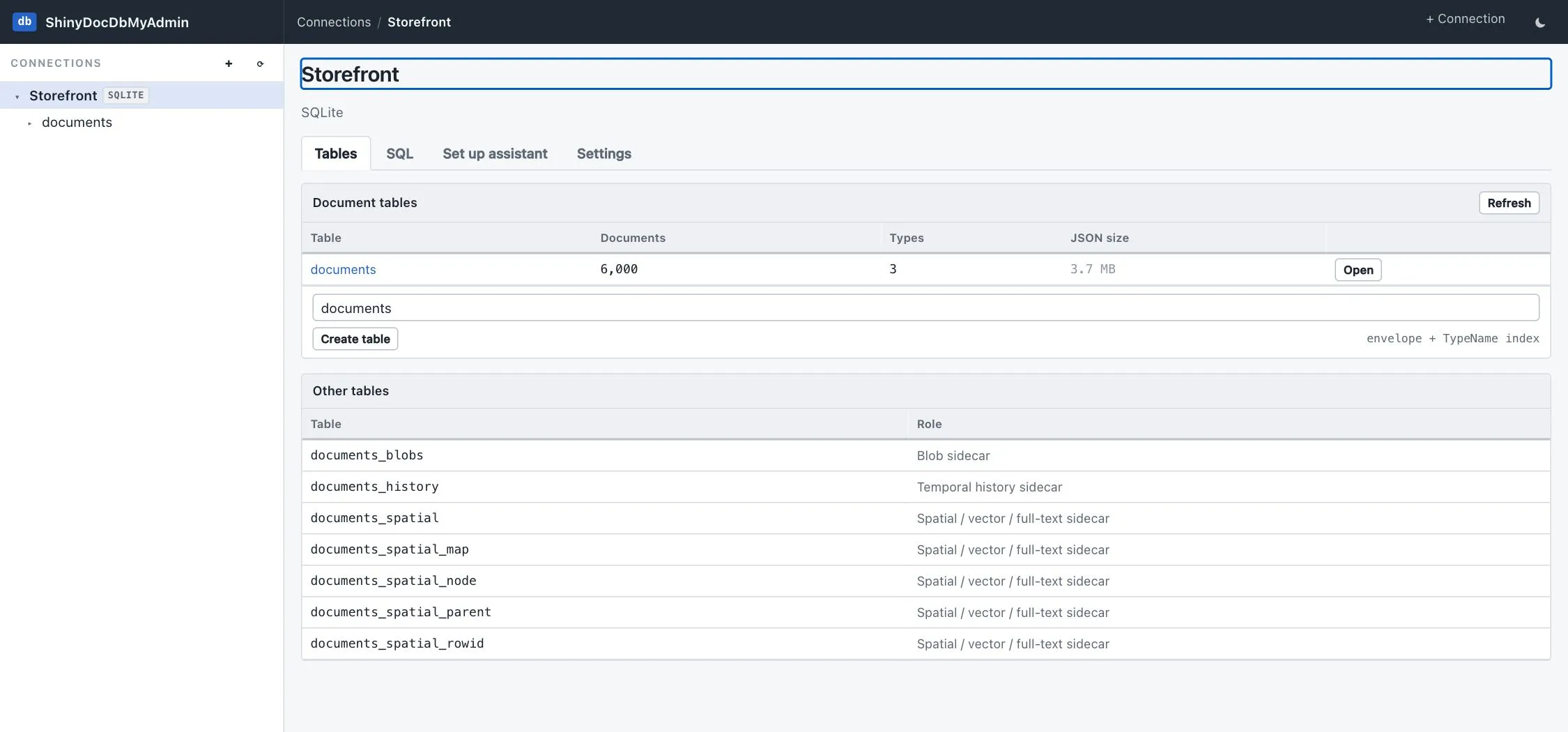
Section titled “Explorer”Connection → table → TypeName, with live document counts. Tables are classified by probing for the
envelope, so temporal/blob/spatial sidecars are recognised and kept out of the way rather than shown as
if they were yours to edit.
Create
Section titled “Create”A documents table (using the provider’s own DDL) and a type (by writing its first document), so a database whose store has never run isn’t a dead end.
Running it
Section titled “Running it”Two published tags, one build. :latest is the ordinary tool; :demo is the same image with
demo mode already on, for a public playground. Pin :<version> or
:demo-<version> when you want them to hold still.
The volume holds saved connections, saved queries and uploaded database files; drop it and the UI starts empty every time.
docker run -p 8085:8080 -v shiny-docdb-myadmin:/data ghcr.io/shinyorg/shiny-docdb-myadminTo reach a database file on your machine, mount its directory and use the container’s path in the connection string:
docker run -p 8085:8080 -v shiny-docdb-myadmin:/data \ -v /Users/me/databases:/databases:ro \ ghcr.io/shinyorg/shiny-docdb-myadminFrom a clone of the repo, either build the image or just run the project:
docker build -f src/ShinyDocDbMyAdmin/Dockerfile -t shiny-docdb-myadmin .dotnet run --project src/ShinyDocDbMyAdminIn an Aspire AppHost it models as a resource — see Aspire AppHost.